Sales Tax Holidays are limited time periods when states suspend or reduce sales tax on specific items. As CereTax continues to add additional categories for Sales Tax Holiday support, these lists will be updated as new information is added.
If your business sells items that are subject to Sales Tax Holidays and you would like to participate, follow the steps below to enable Sales Tax Holiday rates.
What Sales Tax Holidays Does CereTax Support?
Please refer to the table below for a list of supported Sales Tax Holidays and participating states.
Note: If the Airtable is not loading, right click on the table and select "Reload frame." This list can also be downloaded by using the download option found along the bottom of the Airtable.
Which psCodes Apply Sales Tax Holiday Rates?
Please refer to the table below for the full list of psCodes that apply Sales Tax Holiday rates.
Note: If the Airtable is not loading, right click on the table and select "Reload frame." This list can also be downloaded by using the download option found along the bottom of the Airtable.
Completing the Set-up Required to Apply Sales Tax Holiday Rates
Enabling the Sales Tax Holiday setting and updating your psCodes to a Sales Tax Holiday enabled psCode is a one-time task.
Please note that both steps below are required to enable the Sales Tax Holiday rates when applicable. Outside of the Sales Tax Holidays, these new psCodes will apply the regular state rate. Once these changes have been made, Sales Tax Holiday rates will automatically apply for your products/services moving forward.
Step 1: Enable your account for Sales Tax Holidays:
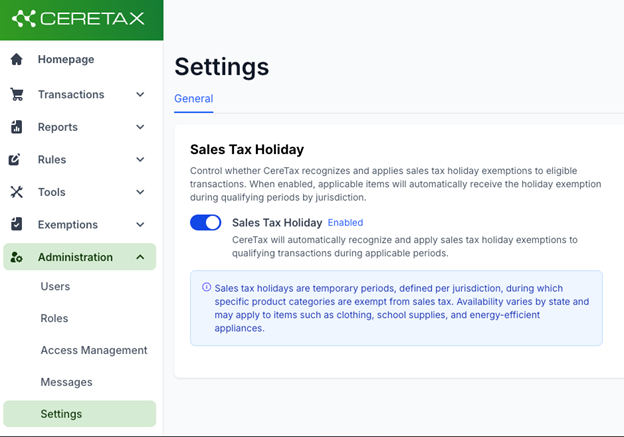
Log into CereTax and navigate to Administration > Settings
Under the General tab, toggle Sales Tax Holiday to On
Step 2: Update psCode Mappings
Where your psCodes are mapped and need to be updated is dependent on your system and how you’re connected to CereTax. psCodes are generally stored in your system on the item record, mapped in CereTax, or included in your API request if you’re an API customer.
Important items to note:
Bundles: if a Sales Tax Holiday eligible product is included in a bundle, Sales Tax Holiday rates are not applicable when included in bundles
QuickBooks Online customers: mapping psCodes in CereTax is required, please review and update your psCodes in CereTax
If you have additional questions, please contact one of the following:
Support@CereTax.com if you are a Live customer (production credentials have been provided to you and you are actively processing transactions in your CereTax production account)
Your dedicated Implementation Specialist if you are still in implementation (production credentials have not been issued to you)
Special note for Business Central users:
You must re-run the CT_MasterUpdateUtility to utilize Sales Tax Holiday psCodes
path --> search for job queue entries, open the CT_MasterUpdateUtility job
click Run once (foreground), wait for job to be completed before new Sales Tax Holiday psCodes become available
Special note for NetSuite users:
You must re-run the Sync Data objects to utilize Sales Tax Holiday psCodes
Go to CereTax > Utilities >
Click on "Sync Data Objects"
The data sync will process in the background and take 5-10 mins to complete.
Special note for nopCommerce users:
You must re-run the Sync psCodes to utilize Sales Tax Holiday psCodes
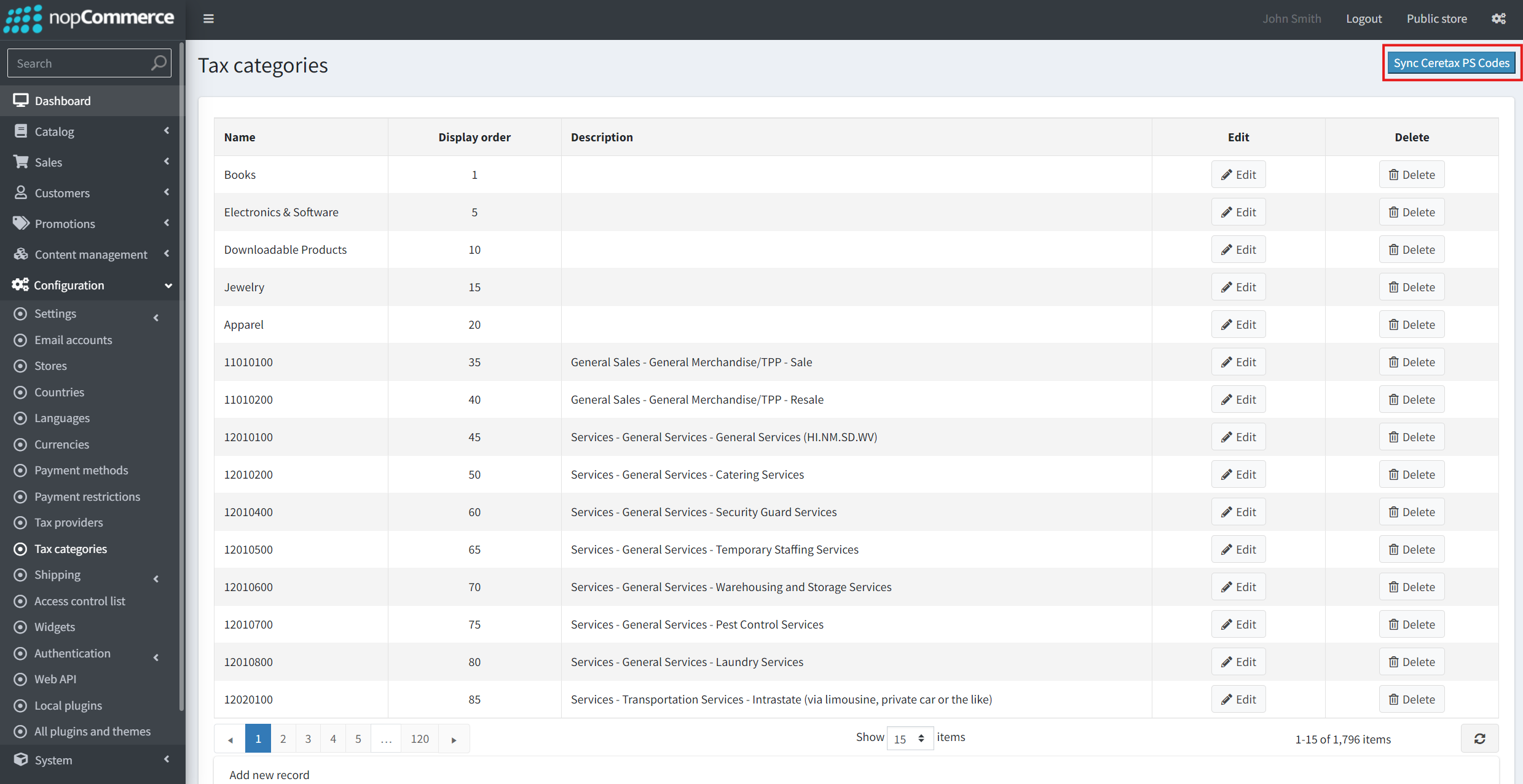
In your nopCommerce dashboard, navigate to Configuration > Tax categories.
Select "Sync Ceretax PS Codes" in the upper right corner.
Refresh the Tax categories page and verify the CereTax PS Codes were loaded.